# Ubuntu 26.04 LTS 'Resolute Raccoon': New Features and Major Changes
Canonical: https://snipgeek.com/blog/ubuntu-26-04-lts-resolute-raccoon-new-features-major-changes
Locale: en
Description: Ubuntu 26.04 LTS breakdown: GNOME 50 on full Wayland, modern toolchain upgrades, enterprise security changes, and AI/GPU improvements before final release.
Date: 2026-03-17
Updated: 2026-03-19
Category: Linux
Tags: ubuntu, ubuntu-26-04, linux, gnome-50, wayland, rocm
JSON: https://snipgeek.com/api/posts/ubuntu-26-04-lts-resolute-raccoon-new-features-major-changes?locale=en
---
Ubuntu 26.04 LTS, codenamed **Resolute Raccoon**, is scheduled for stable release on **April 23, 2026**. To me, this is the kind of Ubuntu release that becomes more interesting the longer you look at it. It does not rely on flashy one-line gimmicks. Instead, it feels like a careful consolidation of transitions Ubuntu had already set in motion in 25.10.
If you have been tracking Ubuntu closely, the direction is easy to recognize. Canonical is tightening the modern desktop stack, moving developers onto newer defaults more aggressively, and investing more seriously in AI and enterprise readiness. What makes 26.04 stand out is that these decisions no longer feel experimental. They feel intentional. This article walks through the changes that matter most and what they mean in everyday use.
This article tracks the pre-release cycle before final stable launch. Package versions and default components can still shift between Snapshot/Beta and the final release build.
## GNOME 50 and the Full Wayland Direction
The headline desktop change is straightforward: Ubuntu is now firmly centered on Wayland sessions. Xorg is no longer the practical path for the default desktop experience. That will make some users nostalgic, but from a platform direction standpoint, the move now feels irreversible.
With **GNOME 50** in place, Ubuntu is also moving closer to a cleaner GNOME baseline. Two app-level changes stand out:
- **Showtime** arrives as a modern replacement for the old video player workflow.
- **Resources** replaces the classic GNOME System Monitor with a newer monitoring experience.
For NVIDIA users, Wayland responsiveness is also getting attention through rendering-related improvements in the GNOME stack, aiming for smoother frame delivery and lower latency.
## Under the Hood: Kernel Track, GCC 15, and OpenJDK 25
At system level, Ubuntu 26.04 brings a strong refresh:
- New Linux kernel track around 6.20 moving toward 7.0 naming.
- **GCC 15** as a default compiler baseline.
- **OpenJDK 25** as the default Java runtime/tooling generation.
- Wider Rust adoption in core areas as part of long-term memory-safety goals.
For developers, this reduces first-day setup friction on new installs. For servers, it improves default compatibility with newer workloads without forcing immediate manual repository additions. In practical terms, Ubuntu 26.04 looks more like a system that expects modern work from day one rather than asking you to retrofit it afterward.
## Server Stack: Data and Identity Options Expand
Ubuntu 26.04 also looks more complete on server and enterprise lanes:
- PostgreSQL 18
- MariaDB 11.8
- DocumentDB (MongoDB API compatibility on PostgreSQL foundations)
- Authd for cloud identity integrations such as Entra ID and Google IAM
That combination gives infrastructure teams broader options for data and authentication workflows while staying closer to official packaging.
## AI and GPU Workloads: ROCm Is Easier to Deploy
One of the most practical AI-related improvements is official **ROCm** availability in standard repositories. For anyone who has spent time dealing with Linux GPU setup friction, this is the kind of change that matters more than a flashy announcement banner. Setup can be as simple as:
```bash
sudo apt install rocm
```
For AMD workstation users, this reduces early deployment friction significantly. On NVIDIA systems, ongoing Wayland improvements in GNOME are also relevant for gaming and desktop compute consistency.
## Security and Enterprise Readiness
Ubuntu 26.04 sharpens several security and operations points:
- TPM-backed Full Disk Encryption flows are easier to manage in Security Center.
- Snap permission prompts are clearer and more explicit.
- OpenSSH 10.2 adds modern cryptographic improvements and removes weaker legacy paths.
This matters in enterprise environments where usability and policy alignment are both required, not just raw security capability.
## GNOME Search Extensions by Default
Ubuntu 26.04 includes additional GNOME Shell search providers:
- Web Search Provider for explicit browser-directed web search actions.
- Snap Search Provider to surface installable Snap apps directly from overview search.
The current approach is more transparent than older search integration controversies because user interaction is explicit before web actions are triggered.
## Yaru Visual Refresh: Cleaner Icons, More Stable Contrast
Yaru receives visible refinements, especially around folder icon style and accent integration.
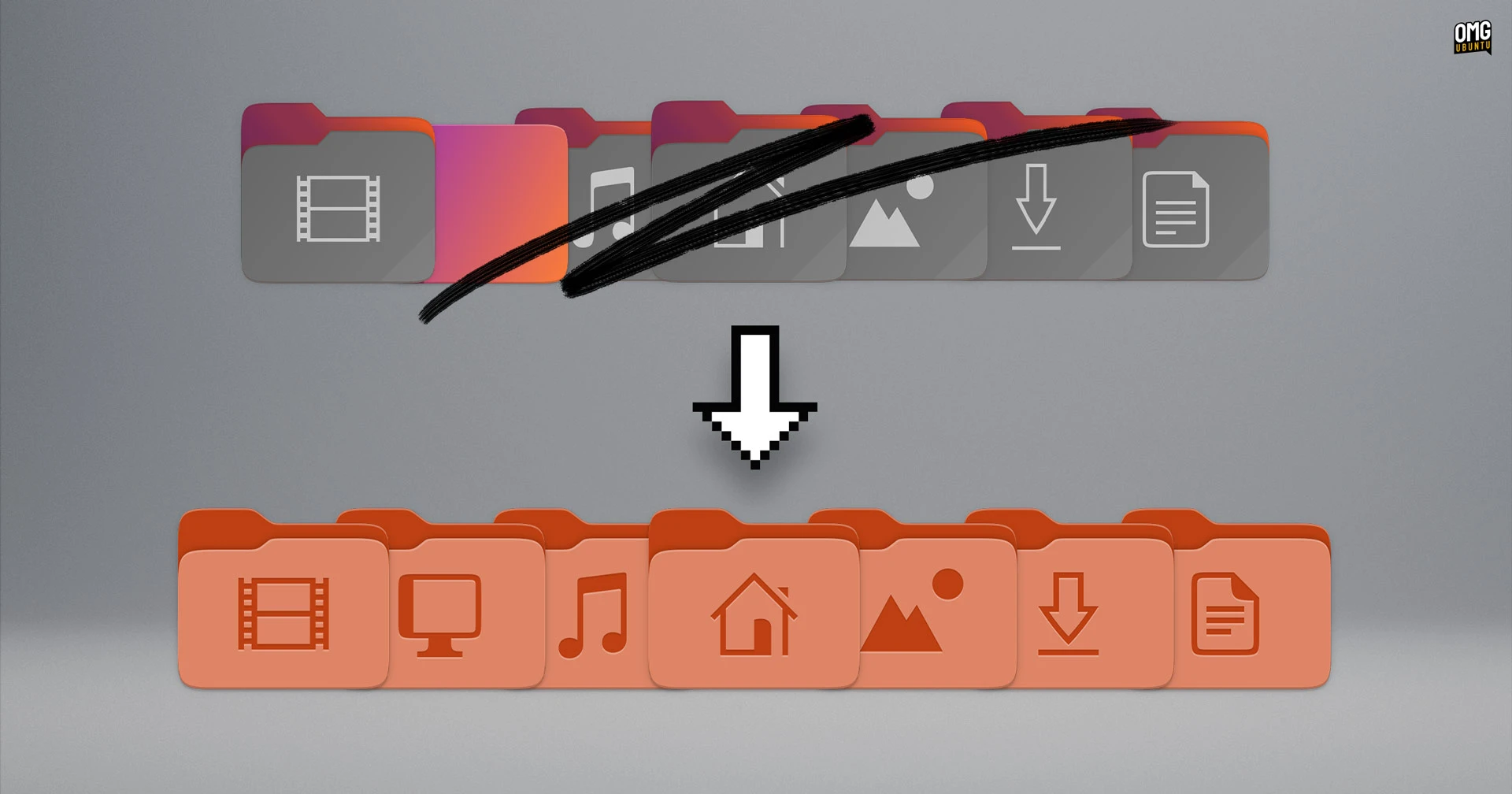
*The Yaru update may look subtle at first glance, but it improves visual consistency across daily desktop use.*
Ubuntu Dock also shifts toward a more solid background, helping maintain contrast and readability on varied wallpapers. Broadly, the design direction is to rely more on GNOME's base and keep Ubuntu-specific overrides focused.
## Resolute Raccoon Default Wallpaper Set
The official Ubuntu 26.04 wallpaper direction is one of my favorite parts of this cycle. The raccoon mascot composition feels centered, clean, and recognizably Ubuntu without simply repeating older framing formulas. It still looks unmistakably Ubuntu, but it does so with a bit more restraint and confidence.



*Image: Ubuntu 26.04 LTS "Resolute Raccoon" default wallpaper set in Color, Dark, and Light variants.*
If you want to download the wallpaper collection and related assets, use the link below:
## Release Timeline and Upgrade Preparation
As Ubuntu 26.04 approaches final, milestones move through UI freeze, beta, kernel freeze, and release candidate in a tight sequence.
If you want to test the latest Snapshot 4 build, use the official download page here:
If you plan to move from 25.10 to 26.04, this is the safest practical flow:
**Back up critical data first**
Save documents, shell configs, and key app data to external or separate storage before touching release upgrades.
**Clean up packages and verify free disk space**
Run routine updates, remove unused packages, and keep enough free space for the full upgrade process.
**Validate mission-critical apps in non-production first**
If this is a work machine, test VPN, dev tooling, and enterprise client apps before committing on your primary environment.
**Upgrade when the official stable channel is ready**
For most users, waiting for the stable release window or early point release provides a much smoother upgrade experience.
## Final Take
Ubuntu 26.04 LTS "Resolute Raccoon" is not really about superficial change. It is about finishing major platform transitions with a more mature baseline: full Wayland, GNOME 50, newer compiler/runtime defaults, stronger enterprise hooks, and easier AI/GPU onboarding.
If your priority is long-term stability, this looks like a strong LTS target. If you also want modern capabilities without jumping into bleeding-edge chaos, Ubuntu 26.04 strikes a balance that feels unusually well judged. From where I stand, that is exactly what a good LTS release should do.
### References
1. [Ubuntu 26.04 Snapshot 4 (Official CD Image)](https://cdimage.ubuntu.com/ubuntu/releases/26.04/snapshot-4/)
2. [Ubuntu 26.04 wallpaper collection (Google Drive)](https://drive.google.com/drive/folders/15ABjpdsI6z4aAHsOY_leA-hT8wD_Pu9X)