YouTube API Quota Exceeded? How to Check and Optimize It
Iwan Efendi4 min

Is your app hitting the YouTube API quota exceeded limit? Learn how to check your quota usage in Google Cloud Console and optimize your API requests.
I was recently coding a helper tool to automatically generate and post short clips for YouTube Shorts. Everything was going smoothly, but I was genuinely worried about the upload limits. If you search Google or ask any AI assistant about YouTube API limits, you will get the exact same warning: "Uploading a video costs 1,600 units, so with a default daily limit of 10,000 units, you can only upload 6 videos a day."
I was ready to accept this constraint, thinking I would have to stretch my Shorts schedule across weeks. But when I finally opened the Google Cloud Console to inspect my project's settings, I was hit with a major surprise. The real-world limits shown in the dashboard were completely different from the internet consensus.
When you enable the YouTube Data API v3, your project gets a default daily budget of 10,000 units. Operation weights do exist:
To see the actual limits assigned to your project, you need to navigate to the Google Cloud Console.
Here is the exact dashboard screen I saw, which completely changed my plan:
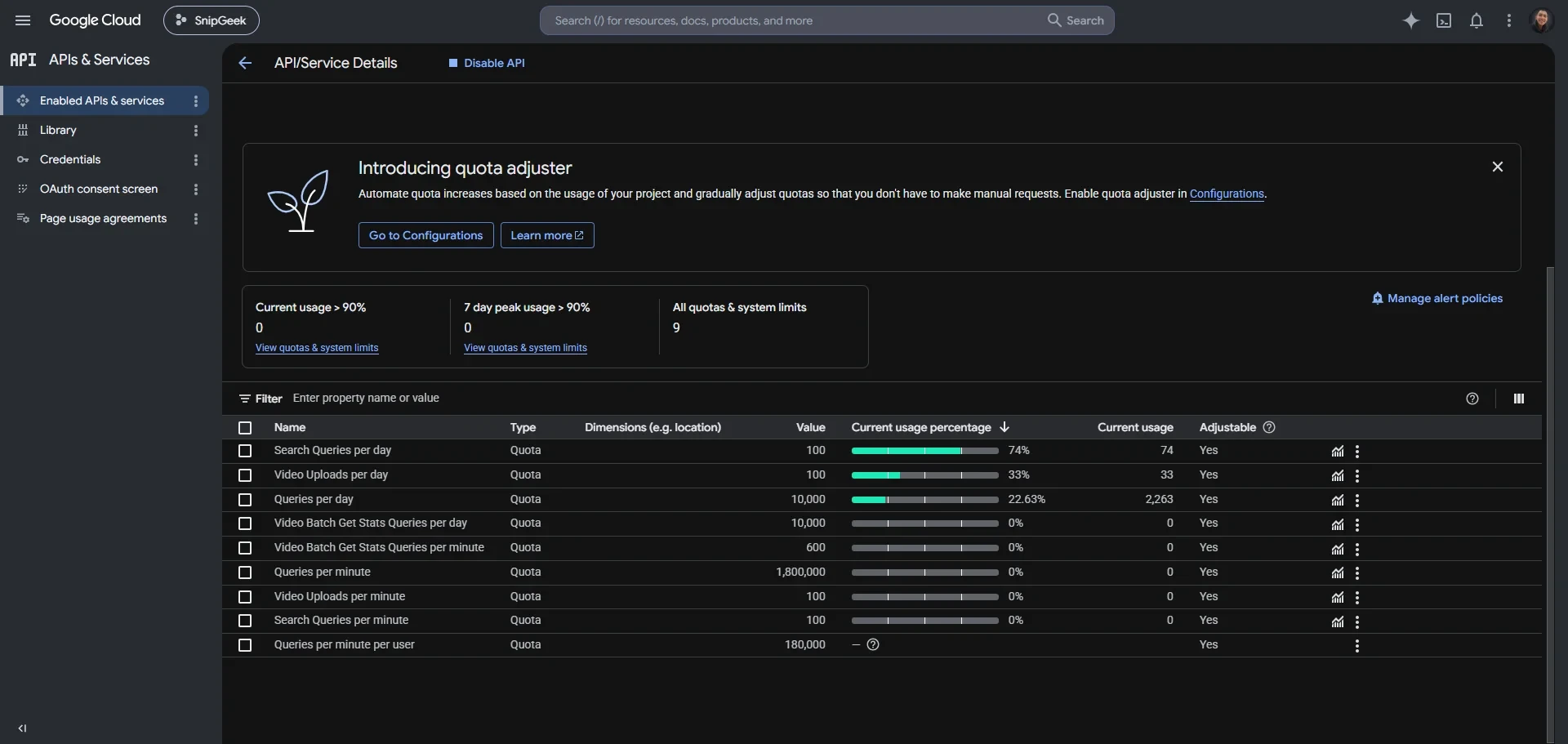 Checking active YouTube Data API v3 quotas in the Google Cloud Console.
Let's break down what is actually happening in this screenshot:
Checking active YouTube Data API v3 quotas in the Google Cloud Console.
Let's break down what is actually happening in this screenshot:
Even though the upload limit is generous, you still need to be careful with the general query limits. A poorly written query loop can still exhaust your 10,000-unit budget in no time.
If your tool scales up and you actually exceed the daily limits, you can ask Google for an increase.
The Default YouTube API Quotas: Hype vs Reality
- Read operations (fetching video lists) cost 1 unit.
- Search operations (using
search.list) cost 100 units. - Write operations (updating metadata) cost 50 units.
How to Check Your Specific API Quota Usage
1
Navigate to the API Dashboard
Open the Google Cloud Console and choose the project where your API key resides. On the left sidebar, click on APIs & Services and select Enabled APIs & Services.2
Open the YouTube API Settings
Find YouTube Data API v3 in the list of active services and click on it. This page displays your API's general health, request charts, and error rates.3
Access the Quota Tab
Click on Quotas at the top of the dashboard. Here, Google lists every active limit enforced on your developer key.Zoom
- Queries per day: This is the main 10,000-unit bucket.
- video Uploads per day: The limit is explicitly set to 100 uploads per day. It is not constrained to 6 uploads as general search articles claim.
- search Queries per day: Google limits search requests to 100 per day by default to prevent key abuse.
Optimizing Your YouTube API Quota Usage
1. Implement Server-Side Caching
Never make a direct API call to Google on every page load. If you are showing a static list of channel videos, cache the API response on your server or database for at least 15 to 30 minutes. If you are building a React or Next.js app, save the parsed results in a Redis store or a local memory cache.2. Avoid Using the Search Endpoint
Thesearch.list endpoint is a quota killer. If you need to retrieve videos from a specific playlist or channel, use the playlistItems.list endpoint instead. A playlist query only costs 1 unit, compared to the 100 units cost of a search query.
3. Request Only the Fields You Need
When querying video details, specify only the necessary parts in thepart parameter. If you only need video titles and thumbnails, request part=snippet. Avoid request combinations like part=snippet,contentDetails,statistics unless you are actively displaying all of that data, as fetching multiple parts can sometimes incur higher processing overhead.
How to Request a Quota Increase
- Go back to the Quotas tab in your Google Cloud Console.
- Click the edit pencil icon next to the quota you want to increase (such as
Queries per day). - Complete the request form. Google will ask for details about your application, how you use the data, and why the current quota is insufficient.
- Note that for large increases, Google may require your app to comply with their developer terms of service, which might take a few business days to verify.
Frequently Asked Questions
References
Topics
Topics in this article
Explore related topics and continue reading similar content.
Share this article
Discussion
Preparing the comments area...
