From 20GB to 32GB RAM: Is the Upgrade Worth It in 2026?
Iwan Efendi3 min
Is upgrading from 20GB asymmetric RAM to 32GB dual-channel worth it? A deep dive into real performance differences for modern workloads in 2026.
Following the earlier discussion on whether 16GB is becoming merely adequate, the next logical question is whether a 20GB configuration represents a meaningful middle ground—and whether moving to 32GB delivers tangible benefits in 2026.
The answer depends less on raw capacity and more on workload characteristics and memory configuration. If your system rarely approaches full memory utilization, upgrading will produce minimal visible change. However, if you frequently encounter lag during heavy multitasking or content creation, the difference can be substantial.
A 20GB setup typically results from combining soldered onboard memory (for example, 4GB or 8GB) with a larger add-on module (commonly 16GB). This arrangement triggers Flex Mode (asymmetric dual-channel operation).
Under this configuration:
The upgrade becomes meaningful when your system regularly exhausts physical RAM and relies on the operating system’s swap mechanism (pagefile in Windows). Once this occurs, the system begins using SSD or HDD storage as temporary memory, which is dramatically slower than RAM.
Before upgrading, evaluate two structural factors that frequently have a greater impact than adding gigabytes.
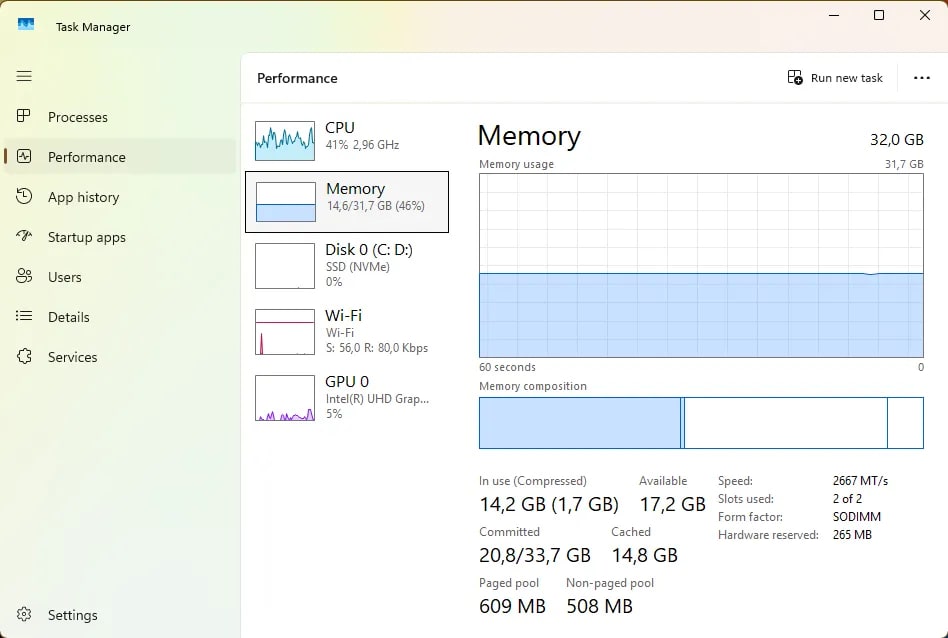
Avoid assumptions. Validate using system monitoring:
Why a 20GB Configuration Often Feels Inconsistent
- A portion of memory operates in full dual-channel mode (higher bandwidth).
- The remaining portion runs in single-channel mode (lower bandwidth).
Zoom
When Upgrading from 20GB to 32GB Delivers Measurable Gains
High-Impact Scenarios
- 4K and Higher Video Editing Large timelines in applications such as DaVinci Resolve or Adobe Premiere Pro can quickly exceed 20GB, especially with effects and color grading layers. Additional RAM reduces swap usage and improves playback stability.
- AI Workloads and Virtualization Running local LLMs, Docker containers, or multiple virtual machines can push memory requirements beyond 16GB even at entry level. For sustained AI experimentation, 32GB provides essential headroom.
- Heavy Multitasking IDEs, dozens of browser tabs, design tools, streaming software, and background services running simultaneously can easily exceed 20GB.
- Consistent Memory Usage Above 80% If peak workloads regularly exceed 80% of installed RAM, the system is operating near saturation. Expanding to 32GB restores performance stability.
Gaming Context Most modern titles remain primarily GPU- and CPU-bound. Moving from 20GB to 32GB rarely increases FPS significantly unless substantial background applications are running (streaming, voice chat, browsers).
Zoom
Factors More Critical Than Capacity Alone
1. Channel Configuration
A matched dual-channel configuration (e.g., 2×16GB) provides:- Higher and more consistent bandwidth
- Reduced latency variability
- Improved stability under sustained load
2. Memory Generation and Speed (DDR4 vs DDR5)
DDR5 offers significantly higher bandwidth compared to DDR4. While the difference may be modest in light gaming, it becomes more pronounced in:- Rendering
- Code compilation
- Simulation
- AI inference workloads
Zoom
How to Determine Whether You Actually Need an Upgrade
Zoom
- Open Task Manager (Ctrl + Shift + Esc).
- Navigate to Performance → Memory.
- Run your heaviest real-world workflow.
-
Monitor:
- In Use
- Committed
- “In Use” consistently approaches total installed memory (e.g., 18GB of 20GB), and
- “Committed” significantly exceeds physical RAM
Configuration Recommendations for 2026
Desktop / Workstation
- Optimal baseline: 2×16GB DDR5 (32GB total)
- For 4K production, AI experimentation, or virtualization-heavy workflows, begin with 32GB rather than scaling from 16GB.
Laptop
If soldered RAM is present (e.g., 8GB onboard):- Add an identical 8GB module to achieve balanced dual-channel (16GB total).
- An asymmetric 24GB (8GB+16GB) configuration may increase capacity but not necessarily bandwidth consistency.
- For higher needs, prioritize systems with two SODIMM slots supporting 2×16GB.
Decision Checklist
| Scenario | Recommendation |
|---|---|
| Frequent swap/pagefile usage | Upgrade to 32GB |
| Browsing, Office, light editing | 20GB is sufficient |
| Creative, AI, virtualization workflows | Standardize at 32GB (2×16GB DDR5) |
| Planning 3–5 year system longevity | Move to 32GB |
Topics
Topics in this article
Explore related topics and continue reading similar content.
Share this article
Discussion
Preparing the comments area...