How to Install SAP GUI for Java 7.80 on Manjaro Linux
Iwan Efendi2 min

A complete guide to installing SAP GUI for Java 7.80 on Linux without an S-user account, including dependencies and configuration.
For professionals working with SAP systems, being able to access the SAP GUI from various operating systems is a real necessity — not just a matter of convenience. The good news is that SAP actually provides SAP GUI for Java, which officially supports Linux. The problem is, to download it officially, you need an S-user account registered on the SAP Service Marketplace. And this is often the main hurdle.
Many of us as SAP users do not have direct access to that portal — it is usually only held by the IT team or company administrators. So even if our Linux is ready, the installer file cannot be obtained easily. I myself was stuck here for quite a while, until I finally received an installer file from a fellow blogger and SAP user. It is thanks to that sharing that this guide can be written — and now you don't have to go through the same frustration.
This guide will show you the easiest way to install SAP GUI for Java 7.80 on Manjaro Linux (and other distros in general), from dependencies to configuration.
SAP GUI for Java 7.80 requires Java Development Kit (JDK) or Java Runtime Environment (JRE) version 17. Make sure this is installed before proceeding.
On Manjaro, the installation is just one command line in the terminal:
This command will install OpenJDK version 17 — the primary dependency needed for the SAP GUI installer to run.
Because of its large size, this
After the 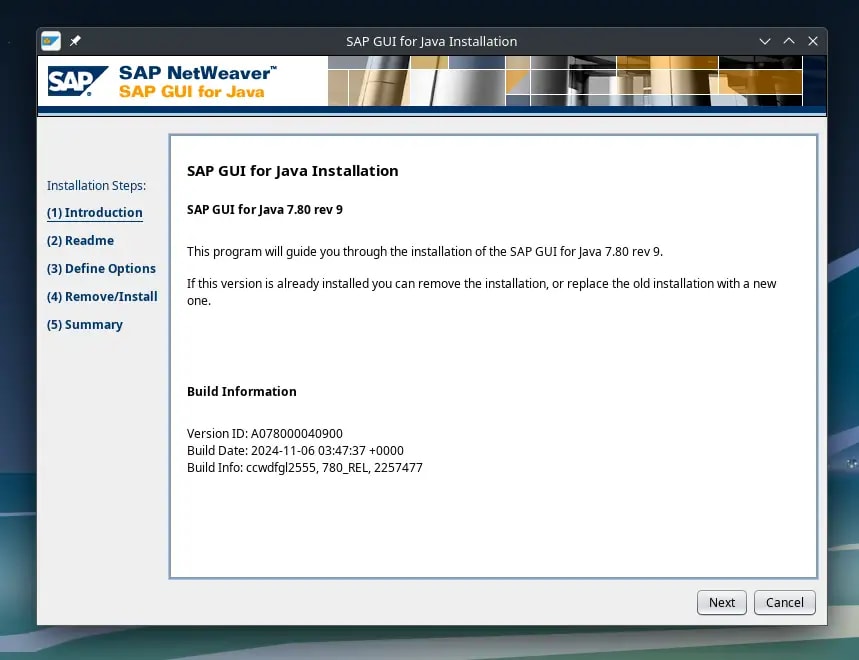 The installation wizard will guide you through every step — just follow it until finished.
After installation is complete, "SAP GUI" will appear in your application menu.
The installation wizard will guide you through every step — just follow it until finished.
After installation is complete, "SAP GUI" will appear in your application menu.
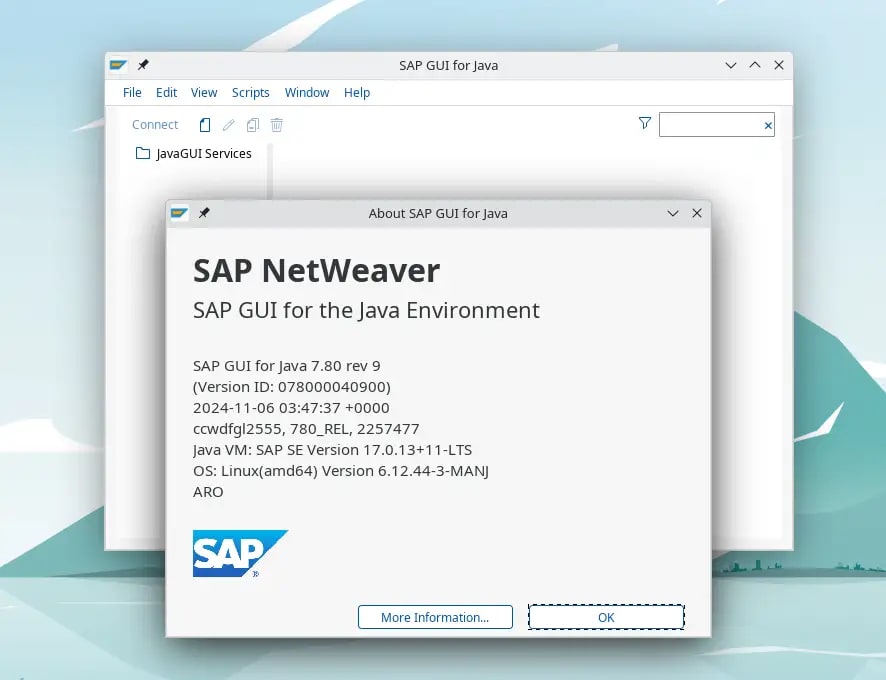 SAP GUI for Java is installed and ready to use.
Our main task — installation — is done. The next step is to configure the connection to your company's SAP system. This process is specific to each company, but generally, the steps look like this:
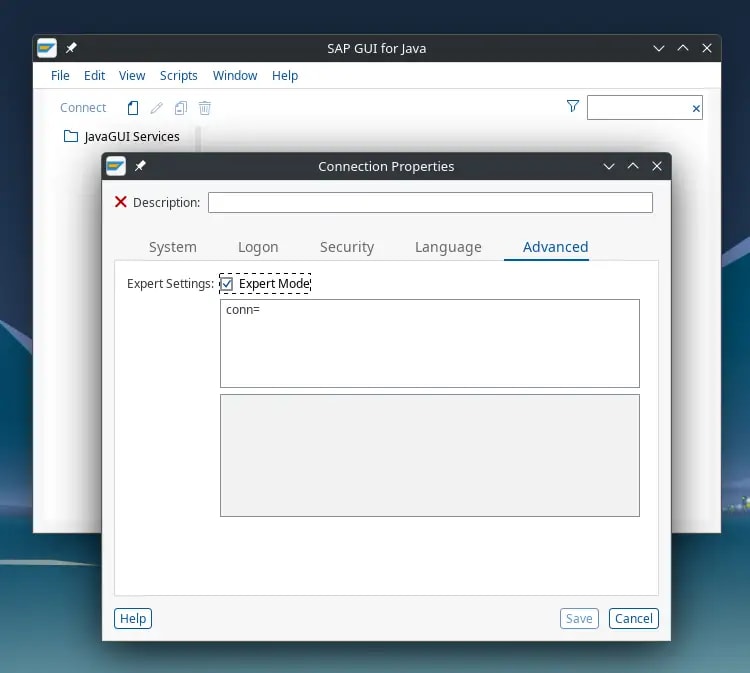 Expert mode allows you to enter the 'Connection String' directly.
For the rest, continue the configuration according to the internal guide from your company's IT team. Congratulations — now you can access the SAP system directly from your Manjaro desktop!
Expert mode allows you to enter the 'Connection String' directly.
For the rest, continue the configuration according to the internal guide from your company's IT team. Congratulations — now you can access the SAP system directly from your Manjaro desktop!
If you installed SAP GUI for Java on Ubuntu or any GNOME-based distro (Fedora, Pop!_OS, Zorin), you may run into a cosmetic-but-annoying bug: the dock shows two icons — the pinned launcher, plus a second "unknown" icon that only appears while the app is running.
It is not a broken installation. GNOME matches a running window to its launcher using the WM_CLASS window property, and Java desktop apps like SAP GUI (also DBeaver and JetBrains IDEs) do not set that value to match their launcher. GNOME then treats the window as a brand-new app and adds a fresh dock icon. The fix is a single line in the Your cursor turns into a crosshair — click the SAP window. You will get output like:The second string is the value you need.Inside the Log out and back in so GNOME re-reads the desktop files, then launch SAP GUI — the pinned icon now becomes the active window icon, no duplicate entry.
The same
#1 Prerequisite: Install Java Runtime
sudo pacman -Syu jre-17-openjdk#2 Download SAP GUI for Java 7.80 Installer
.jar format installer file is divided into 3 parts. You must download all three and place them in the same folder before extracting.
SAP GUI for Java 7.80 - Part 1Download
SAP GUI for Java 7.80 - Part 2Download
SAP GUI for Java 7.80 - Part 3Download
📦 Important: Extract before installing Once all three files are downloaded, extract the first file (.part1.rar). The extraction process will automatically combine all parts and produce one main installer file:PlatinGUI780_0-80006509.JAR.
#3 Run the Installation Process
.JAR file is successfully extracted, the installation process is very easy — as long as the Java Runtime from step #1 is installed correctly.
- Locate the
PlatinGUI780_0-80006509.JARfile in your folder. - Right-click on the file, select "Open With Other Application", then choose "OpenJDK Java 17 Runtime".
- A graphical installation wizard will appear. Just follow the on-screen instructions, click "Next" until the process is complete.
Zoom
Zoom
#4 Initial Connection Configuration
- Open the SAP GUI application.
- Click New to create a new connection.
- Go to the Advanced tab.
- Check the "Expert Mode" box.
- Copy and paste the Connection String provided by your company's IT team into the available field.
Zoom
#5 Troubleshooting: Duplicate Icon on Ubuntu / GNOME
.desktop file.
1
Find the WM_CLASS
Launch SAP GUI, then run in a terminal:xprop WM_CLASSWM_CLASS(STRING) = "SAP GUI for Java", "SAP GUI for Java"
2
Add StartupWMClass to the launcher
nano ~/.local/share/applications/SAPGUI7.80.desktop[Desktop Entry] section, add:StartupWMClass=SAP GUI for Java3
Refresh the desktop database and re-login
update-desktop-database ~/.local/share/applicationsStartupWMClass trick fixes duplicate dock icons for any Java app, so keep it in mind the next time a .desktop launcher misbehaves.
References
Topics
Topics in this article
Explore related topics and continue reading similar content.
Share this article
Discussion
Preparing the comments area...