KDE Plasma Finally Gets Per-Screen Virtual Desktops
Iwan Efendi5 min
KDE Plasma now lets each monitor switch virtual desktops independently — a 21-year Linux request, and Ubuntu already has its own take on it.
Running two monitors and a KDE Plasma desktop for the past few months, I kept noticing one annoying quirk: whenever I switched virtual desktops, both screens jumped at the same time. If I was focused on one monitor for a task and needed to flip to a different desktop on the other, there was no clean way to do it. The whole workspace shifted together. That felt like a missed opportunity for a desktop environment that's otherwise full of fine-grained controls.
Turns out, I was not alone in that frustration. The feature request to let each screen independently switch virtual desktops had been sitting open in KDE's bug tracker since 2005 — that's 21 years of waiting.
The headline change from the "This Week in Plasma" post published on April 18, 2026 is straightforward but significant:
Before I got too excited about KDE catching up, I remembered that GNOME on Ubuntu has had a related concept for a while — it just works differently.
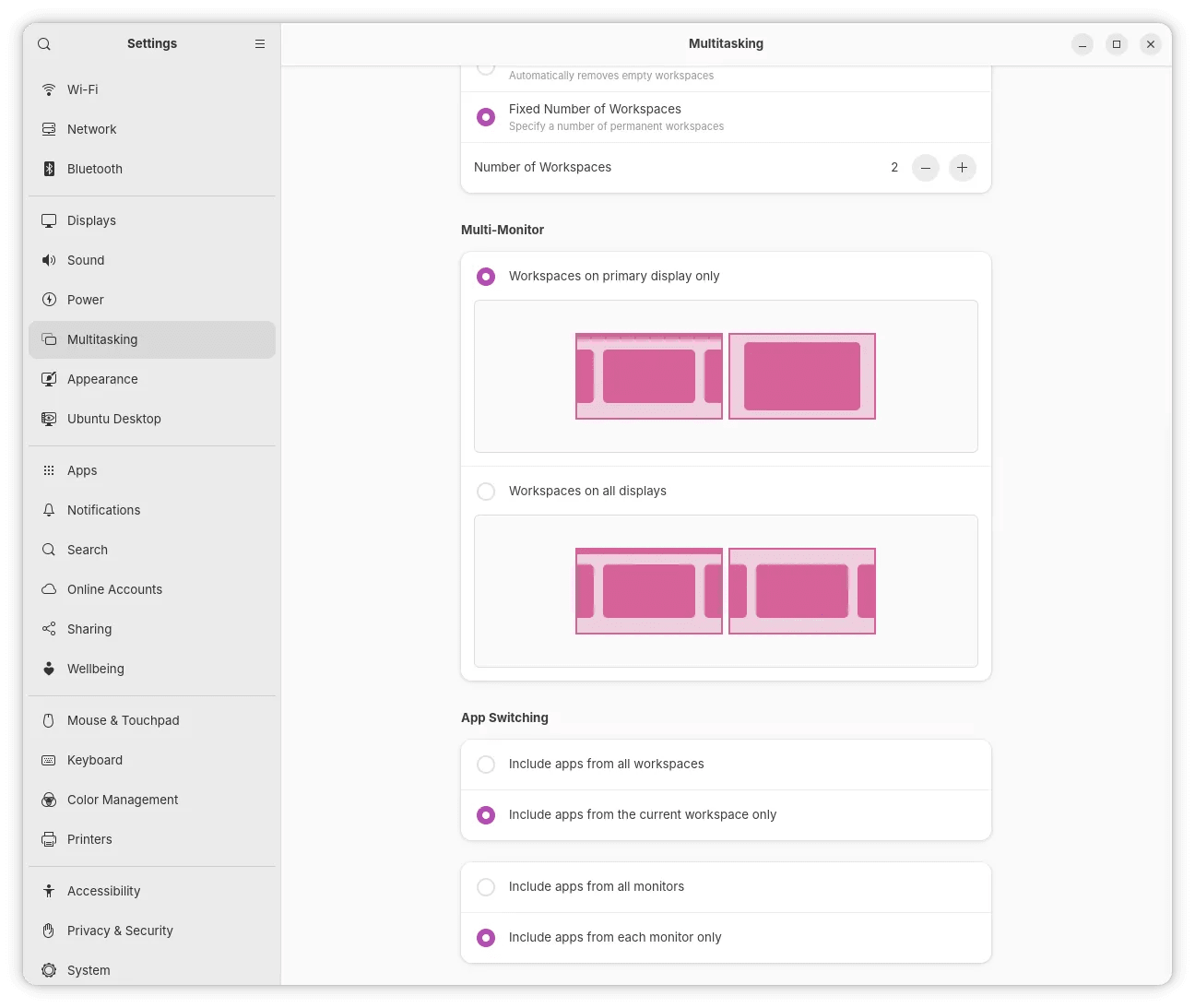
In Ubuntu's Settings → Multitasking, there's an option under "Multi-Monitor" that lets you choose between:
 The per-screen virtual desktop feature is the flagship, but this TWiP issue also packed in several other improvements worth knowing about:
I spend most of my computing time on Ubuntu with GNOME, so the KDE-specific features here are more of a technical watch than an immediate change for me. But I genuinely think the per-screen virtual desktop approach KDE landed is the cleaner implementation of the two. The GNOME multi-monitor workspace setting is useful, but it's more of a global toggle — it doesn't give you the same granular, per-screen control KDE is now offering.
If you're on KDE Plasma and have been working around this limitation for years — or if you've been curious whether a multi-monitor Wayland setup on Linux has finally matured enough to replace your Windows workflow — this release is a meaningful checkpoint. The Wayland session restore infrastructure is equally significant, even if the payoff takes a few more months to fully land in apps.
For Ubuntu users, the multi-monitor workspace setting in Settings → Multitasking is worth revisiting if you haven't touched it. It's not as powerful as KDE's new model, but it's already there and often overlooked.
If you're exploring the broader state of Ubuntu in 2026, my write-up on GNOME 50 and Ubuntu 26.04 covers more of the display and workspace improvements that shipped with the latest LTS. And if you're weighing Linux options more broadly, the dual-boot relevance piece might help frame the decision.
Have you tried the per-screen desktop switching on KDE, or are you using Ubuntu's multitasking setting for something similar? Drop a comment — I'm curious how different setups are working out in practice.
The per-screen virtual desktop feature is the flagship, but this TWiP issue also packed in several other improvements worth knowing about:
I spend most of my computing time on Ubuntu with GNOME, so the KDE-specific features here are more of a technical watch than an immediate change for me. But I genuinely think the per-screen virtual desktop approach KDE landed is the cleaner implementation of the two. The GNOME multi-monitor workspace setting is useful, but it's more of a global toggle — it doesn't give you the same granular, per-screen control KDE is now offering.
If you're on KDE Plasma and have been working around this limitation for years — or if you've been curious whether a multi-monitor Wayland setup on Linux has finally matured enough to replace your Windows workflow — this release is a meaningful checkpoint. The Wayland session restore infrastructure is equally significant, even if the payoff takes a few more months to fully land in apps.
For Ubuntu users, the multi-monitor workspace setting in Settings → Multitasking is worth revisiting if you haven't touched it. It's not as powerful as KDE's new model, but it's already there and often overlooked.
If you're exploring the broader state of Ubuntu in 2026, my write-up on GNOME 50 and Ubuntu 26.04 covers more of the display and workspace improvements that shipped with the latest LTS. And if you're weighing Linux options more broadly, the dual-boot relevance piece might help frame the decision.
Have you tried the per-screen desktop switching on KDE, or are you using Ubuntu's multitasking setting for something similar? Drop a comment — I'm curious how different setups are working out in practice.
The Feature KDE Users Waited 21 Years For
Each screen can now switch between any of the system's virtual desktops independently.Contributed by Hynek Schlindenbuch (KDE Bugzilla #107302), this is exactly the kind of quality-of-life upgrade that sounds small on paper but transforms the way multi-monitor setups actually feel to work in. No more dragging the entire session context across screens every time you need a clean workspace on one side. The demo video makes it visually clear — each monitor has its own desktop switcher. You can have your code on Desktop 1 on the left screen while your browser is independently showing Desktop 3 on the right. They move separately, not in lockstep.
Freshness Note
This feature is part of KDE Plasma's development cycle as of April 2026. Check your distribution's KDE Plasma version to confirm when this lands in your system's update channel.
Ubuntu Already Has Its Version of This
- Workspaces on primary display only — other monitors show a static view of the active workspace
- Workspaces on all displays — switching workspaces affects all connected monitors simultaneously
Zoom
Ubuntu 26.04 Multitasking settings — the "Workspaces on primary display only" option gives you independent workspace control per monitor.
That said, the Ubuntu/GNOME implementation and KDE's new per-screen virtual desktop behavior are not identical. GNOME's model lets secondary monitors stay "fixed" while only the primary display switches workspaces — it's a workspace visibility toggle rather than true independent switching. KDE's approach is more granular: each screen gets its own switcher and can independently jump to any desktop in the system's pool.
For power users with two or more monitors doing genuinely different tasks simultaneously, KDE's model offers more flexibility. For most people with a simple two-monitor setup, Ubuntu's toggle is already useful and gets you 80% of the way there without needing to configure anything extra.
Other Notable Changes in This Plasma Update
- Default calendar app chooser — You can now pick your preferred calendar application directly from System Settings → Default Applications.
- Alt+Tab always on primary screen — Configure the window switcher to always appear on the primary monitor, regardless of where your pointer or keyboard focus is. A subtle but welcome improvement for setups with one "main" screen.
- App action favorites — Mark specific app actions from search results as favorites for faster access.
- Kicker highlights new apps — The Kicker Application Menu now highlights newly installed apps, matching the existing behavior in Kickoff.
- Drag-and-drop favorites — You can now drag apps directly into the Favorites sections of Kickoff, Kicker, and Dashboard widgets.
- Discover can quit after updates — Optionally configure Discover to close automatically after it finishes installing updates.
- Wayland session restore — KWin now supports the Wayland session management protocol, which is an important step toward apps being able to remember their window sizes and positions after reboots. Toolkits and apps still need to implement support on their end, but the foundation is now in KWin.
- System Monitor GPU naming — System Monitor now differentiates multiple GPUs by their actual names instead of arbitrary numbers.
- KRunner math improvements — You can now type expressions like
2 + sqrt(2)and KRunner evaluates them correctly in both orders.
Wayland Session Restore
The Wayland session management protocol landing in KWin is bigger than it looks. This is the infrastructure needed for apps to restore their previous positions and sizes after logout or reboot — something X11 users have taken for granted for years. The next step is for individual apps and toolkits to implement their end of it.
SnipGeek's Take
References
Topics
Topics in this article
Explore related topics and continue reading similar content.
Share this article
Discussion
Preparing the comments area...