Fix Error 0xc000007b: Install AIO Runtimes for Windows
Iwan Efendi3 min

Solve the frustrating 0xc000007b error and fix PES 2017 settings not opening using the All-in-One Runtimes package.
The error message "The application was unable to start correctly (0xc000007b)" is one of the most common and frustrating problems faced by gamers and Windows users, especially after a clean installation or when trying to run older applications.
I recently experienced it myself when trying to reinstall the game PES 2017. This error also caused the
After switching back and forth between Windows 10 and Windows 11, trying to reinstall DirectX, and even re-downloading the game, I realized the problem wasn't with the operating system, but with missing supporting components.
The 0xc000007b error is basically Windows' way of saying, "I can't find all the 'ingredients' this application needs to run." These "ingredients" are library and runtime files that form the foundation for many applications and games, especially those built with C++.
The root cause is almost always a 32-bit vs. 64-bit conflict. When a 64-bit application attempts to load a 32-bit DLL file (or vice versa) in Windows directories like
Here is a quick diagnosis table mapping the specific missing DLL error to the runtime package you actually need to install:
If you are setting up emulators like PCSX2 on a fresh OS, checking my guide on how to install PCSX2 emulator on PC shows how these dependencies play a major role in gaming stability.
When faced with a missing DLL error, the easiest shortcut seems to be downloading the single DLL file from online sites and dropping it into system folders. This is highly dangerous.
By running this single installer, you ensure that all missing or damaged system dependencies are updated and repaired at once.
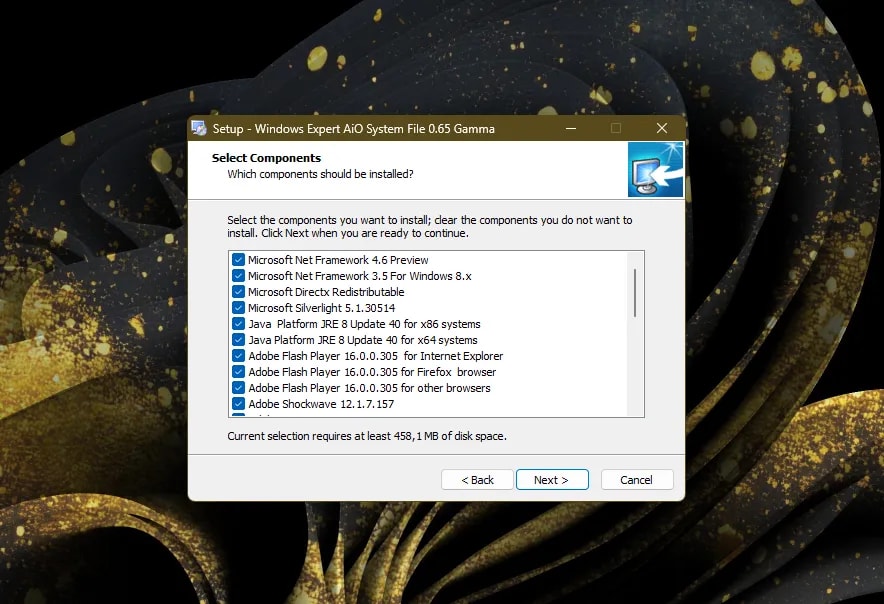
Follow these steps to deploy the package safely:
You can download the AIO Runtimes package that has been proven to solve this issue via the link below:
AIO Visual C+, DirectX, .Net Runtimes400 MB+Download
By installing this complete package, you can resolve 99% of error issues caused by a lack of supporting applications, ensuring your games and apps run smoothly. Hopefully, this guide is helpful!
Settings.exe of PES 2017 to fail to open entirely. After some troubleshooting, I found the ultimate solution that finally allowed the game to run perfectly.
Why Does This Error Occur?
System32 or SysWOW64, Windows throws the 0xc000007b code.
The most common scenarios include:
- A Clean Windows Installation: Modern Windows 11 no longer includes many legacy runtimes by default. If you just did a clean install of Windows 11 or went through the standard post-install checklist, you'll likely run into this.
- Corrupt Runtime Files: An incomplete installation or a failed update can damage existing runtime files.
- Manual DLL Pasting: Many users copy random
.dllfiles directly into their system folders, causing mismatch errors.
Mapping Common DLL Errors to Runtimes
| Missing DLL File | Required Package | Common Affected App/Game |
|---|---|---|
msvcp140.dll / vcruntime140.dll | Visual C++ Redistributable 2015-2022 | PES 2017, GTA V, Adobe Photoshop |
msvcr100.dll / msvcp100.dll | Visual C++ Redistributable 2010 | Older Steam Games, Emulators |
d3dx9_43.dll / xinput1_3.dll | Microsoft DirectX Redistributable | PCSX2 Emulator, retro games |
mfc100u.dll | Visual C++ Redistributable 2010 SP1 | Legacy utility tools |
Why Avoid Loose DLL Downloads?
- Malware Risk: Online DLL directories are notorious for bundling spyware or miners inside DLL files.
- Dependency Issues: Runtimes rarely depend on just one file. Pasting one DLL usually leads to a different DLL error.
- System Instability: Overwriting files in
System32with incorrect versions can corrupt your Windows installation.
The Most Efficient Solution: AIO Runtimes
Zoom
Components Included in the Package:
- Adobe Shockwave & Adobe AIR
- Microsoft DirectX Managed Code & Redistributable
- Visual C++ 2005 to 2015-2022 (x86 & x64)
- Microsoft .NET Framework (various versions)
- Microsoft Silverlight & Java JRE
- Microsoft Visual F# & J# Runtimes
How to Install AIO Runtimes Pack
1
Download AIO Runtimes
Download the verified AIO Runtimes installer using the link in the section below.2
Temporary Antivirus Bypass (If Needed)
Antivirus programs might scan deep into archived runtime bundles and flag them as false positives. If the download is blocked, check my guide on how to temporarily disable Windows Defender during installation.3
Launch the Installer
Double-click the downloaded.exe file. The package will extract its contents and display a selection checklist.4
Choose Components and Install
Leave the default selections to install everything (recommended to resolve 0xc000007b permanently) or customize the list. Click Install and wait for the automated routine to complete.Download Link
Frequently Asked Questions
By installing this complete package, you can resolve 99% of error issues caused by a lack of supporting applications, ensuring your games and apps run smoothly. Hopefully, this guide is helpful!
Topics
Topics in this article
Explore related topics and continue reading similar content.
Share this article
Discussion
Preparing the comments area...