Trying Antigravity: The AI Code Editor That Caught My Eye
Iwan Efendi6 min
My first real impressions of Antigravity on Linux, from the Google One trial and AI model quotas to Ubuntu install issues and app crashes.
I kept seeing Antigravity show up on TikTok.
At first I thought it was just another AI code editor trying to ride the same wave as Cursor, Windsurf, and Zed. But the more clips I saw, the more curious I got. The name was unusual, the UI looked clean, and the promise was obvious: premium AI models inside a dedicated editor, not just an extension layered on top of something else.
So I finally tried it myself.
Before going too far, some context matters here: I am still very new to Linux.
I only started using a dual-boot setup recently, and on the Linux side I have barely touched two editors so far: VS Code and Antigravity. Windsurf is already installed on my machine, but I still have not given it proper time yet.
That means this is not a review from a terminal veteran or a long-time Linux power user. This is a first-hand impression from someone still adapting, still learning, and still getting surprised by basic things.
If you are in that same phase, my experience may be more useful than a polished benchmark-heavy review.
Linux was not my first stop.
Before this, I had already installed Antigravity on Windows, also because of TikTok. My early impression there was mixed. The AI side looked interesting, but the app itself did not feel especially stable. The most annoying issue was the login flow. Some attempts just failed for no clear reason, so I had to retry more than once.
Still, the free trial was attractive enough that I kept poking around. That is what made me want to try the Linux version too, mainly to see whether it behaved any better there.
What immediately stood out to me was how Antigravity handles distribution on Ubuntu.
This is not just a random AppImage dropped on a landing page. Antigravity ships through its own APT repository hosted on Google Cloud, complete with a GPG signing key. That does not automatically make the app better, of course, but it does tell me the team is thinking beyond a quick prototype.
For an editor in this category, that matters. Updates, trust, and long-term maintenance are part of the product, not just the AI panel.
This was the part that pulled me in the fastest.
Antigravity is not fully free, but I managed to claim a 30-day free trial through a promotion in the Google One app on Android. I was just browsing the app casually and found the offer there.
After claiming it, I got 1,000 AI Credits on top of the trial access. That makes the whole thing much easier to test properly, because you are not limited to a tiny teaser before the paywall becomes the entire story.
Once I got into Settings → Models, I could see that Antigravity was not playing it safe with model access. The list on my account included:
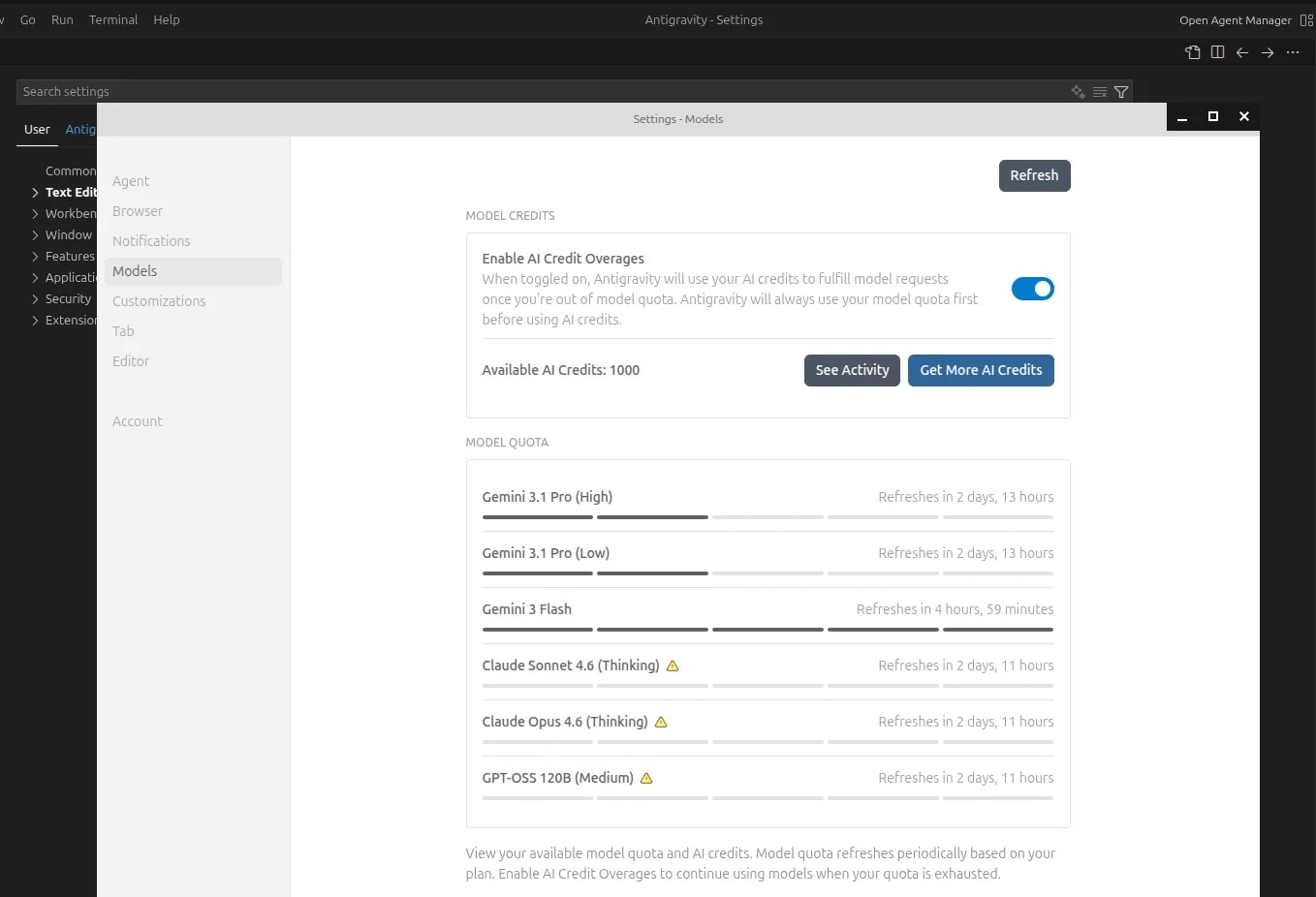 This was the screen that made the trial feel more serious than I expected.
The official install flow only looked like three simple steps. In practice, I hit a problem immediately: curl was not installed yet on my system.
That small missing dependency was enough to break the first step. The repository entry was added, but the GPG key download failed. After that,
The fix was straightforward once I understood what had happened.
That little detour was a good reminder that official install docs often assume a more complete base system than what a fresh Linux setup actually has.
This is the part where I need to be blunt.
Even though using Antigravity has been interesting, I cannot call it stable yet on Linux. I ran into crashes more than once, and one of the messages looked like this:
This was the screen that made the trial feel more serious than I expected.
The official install flow only looked like three simple steps. In practice, I hit a problem immediately: curl was not installed yet on my system.
That small missing dependency was enough to break the first step. The repository entry was added, but the GPG key download failed. After that,
The fix was straightforward once I understood what had happened.
That little detour was a good reminder that official install docs often assume a more complete base system than what a fresh Linux setup actually has.
This is the part where I need to be blunt.
Even though using Antigravity has been interesting, I cannot call it stable yet on Linux. I ran into crashes more than once, and one of the messages looked like this:
 Not the kind of message you want to see in the middle of a coding session.
I genuinely hope the developers keep polishing it, because the foundation is not bad at all.
Antigravity is interesting. That part is easy.
Getting access to models like Claude Opus, Claude Sonnet, Gemini Pro, and GPT-OSS from inside one editor is a real selling point, especially when the quota system is visible enough to manage. The fact that the Linux distribution is handled through a proper APT repository also gives it a more serious feel than a throwaway experiment.
But if I am being honest, I would be much more cautious about paying for it right now if not for the 30-day Google One trial. The crashes on Linux and the earlier login issues I saw on Windows both suggest the product still has important work to do before it feels dependable.
For now, I think the best approach is simple: enjoy the trial, test the AI models, use the credits carefully, and keep expectations realistic.
If you want to check the product yourself, you can visit the official Antigravity product page.
If you found Antigravity through TikTok too, or you have already spent more time with it than I have, I would be curious to know whether your experience has been smoother.
Not the kind of message you want to see in the middle of a coding session.
I genuinely hope the developers keep polishing it, because the foundation is not bad at all.
Antigravity is interesting. That part is easy.
Getting access to models like Claude Opus, Claude Sonnet, Gemini Pro, and GPT-OSS from inside one editor is a real selling point, especially when the quota system is visible enough to manage. The fact that the Linux distribution is handled through a proper APT repository also gives it a more serious feel than a throwaway experiment.
But if I am being honest, I would be much more cautious about paying for it right now if not for the 30-day Google One trial. The crashes on Linux and the earlier login issues I saw on Windows both suggest the product still has important work to do before it feels dependable.
For now, I think the best approach is simple: enjoy the trial, test the AI models, use the credits carefully, and keep expectations realistic.
If you want to check the product yourself, you can visit the official Antigravity product page.
If you found Antigravity through TikTok too, or you have already spent more time with it than I have, I would be curious to know whether your experience has been smoother.
I Am Still New to Linux
I Actually Tried It on Windows First
What Antigravity Is Trying to Be
The 30-Day Free Trial Came from Google One
Worth Checking First
If you already have Google One, it is worth opening the app and checking whether the same Antigravity promo is still available on your account.
The Model List Is Genuinely Interesting
- Gemini 3.1 Pro in different quota tiers
- Gemini 3 Flash
- Claude Sonnet 4.6 (Thinking)
- Claude Opus 4.6 (Thinking)
- GPT-OSS 120B (Medium)
Zoom
How to Enable AI Credit Overages
This option is useful, but the location is easy to miss the first time.1
Open Settings from the editor menuDo not look for a separate Antigravity-branded settings page first. Open the regular Editor menu, then enter Settings.
2
Go to the Models tabInside Settings, switch to Models to see the list of available AI models and their quotas.
3
Enable AI Credit OveragesTurn on Enable AI Credit Overages if you want Antigravity to keep working after a model's quota runs out by using your remaining AI Credits.
How I Would Save Credits
Because the credits are limited, I would not throw the biggest model at every prompt.- For lightweight questions or quick exploration, Gemini 3 Flash already feels like the sensible first choice.
- For coding tasks that need stronger reasoning or better rewrites, Gemini Pro or Claude Sonnet make more sense.
- Claude Opus is the kind of model I would keep for genuinely messy problems, not routine editor chatter.
Installing It on Ubuntu Was Not as Smooth as I Expected
apt update threw this error:
NO_PUBKEY C0BA5CE6DC6315A31
Install curl first
sudo apt install curl -y2
Download the Antigravity repository signing key again
curl -fsSL https://us-central1-apt.pkg.dev/doc/repo-signing-key.gpg | \
  sudo gpg --dearmor --yes -o /etc/apt/keyrings/antigravity-repo-key.gpg
3
Verify that the key exists
sudo gpg --no-default-keyring \
  --keyring /etc/apt/keyrings/antigravity-repo-key.gpg \
  --list-keys
4
Refresh package indexes and install Antigravity
sudo apt update
sudo apt install antigravityStability Still Feels Like the Biggest Problem
Zoom
"Sorry, the program 'antigravity' closed unexpectedly. Your computer does not have enough free memory to automatically analyze the problem and send a report to the developers."That is a rough failure mode. Crashing is already bad enough, but crashing in a way that also prevents bug-report analysis because memory is exhausted makes the whole thing feel even less mature. And this is where my Linux experience started to rhyme with what I had already seen on Windows. The exact issue was different there, but the underlying feeling was similar: Antigravity is promising, but it is still carrying some instability that is hard to ignore.
A Few Screenshots from My Trial
A quick look at Antigravity on my setup, from the editor surface to the rougher moments.
My Temporary Verdict
Topics
Topics in this article
Explore related topics and continue reading similar content.
Share this article
Discussion
Preparing the comments area...