My Dev Laptop Setup: Windows 11, WSL 2 Ubuntu & 9Router
Iwan Efendi6 min
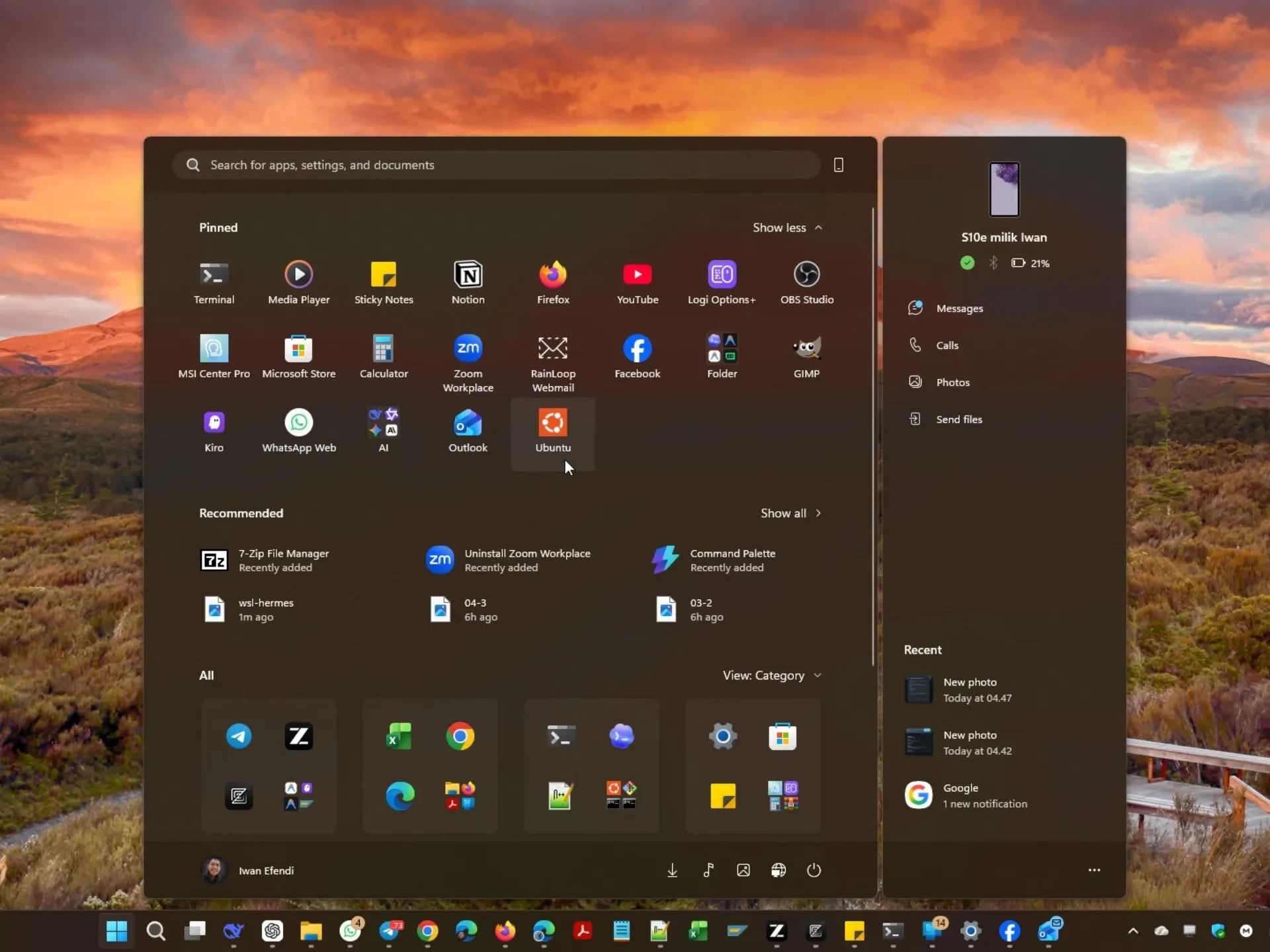
How I set up my MSI Modern 14 laptop with Windows 11, WSL 2 Ubuntu 26.04, and 9Router AI gateway for modern web development.
I've never been the kind of developer who obsesses over the perfect setup. Truth is, I'm just an amateur who loves tinkering — trying things, breaking them, and occasionally stumbling into something that actually clicks. A few months ago, I got tired of the constant context-switching between Windows for daily tasks and Linux for development. That's when I decided to give WSL 2 a serious try, paired with a local AI routing setup I'd been hearing about.
What I ended up with genuinely surprised me. It's not perfect, but it works well enough that I want to share it — partly because I wish someone had laid this out for me when I was Googling around.
This is my daily driver: an MSI Modern 14 B11MOU. Nothing flashy, just a reliable workhorse I call SILULA (yes, I name my laptops — don't judge). It's an entry-level machine I've slowly upgraded over time.
Here's what SILULA is packing under the hood:
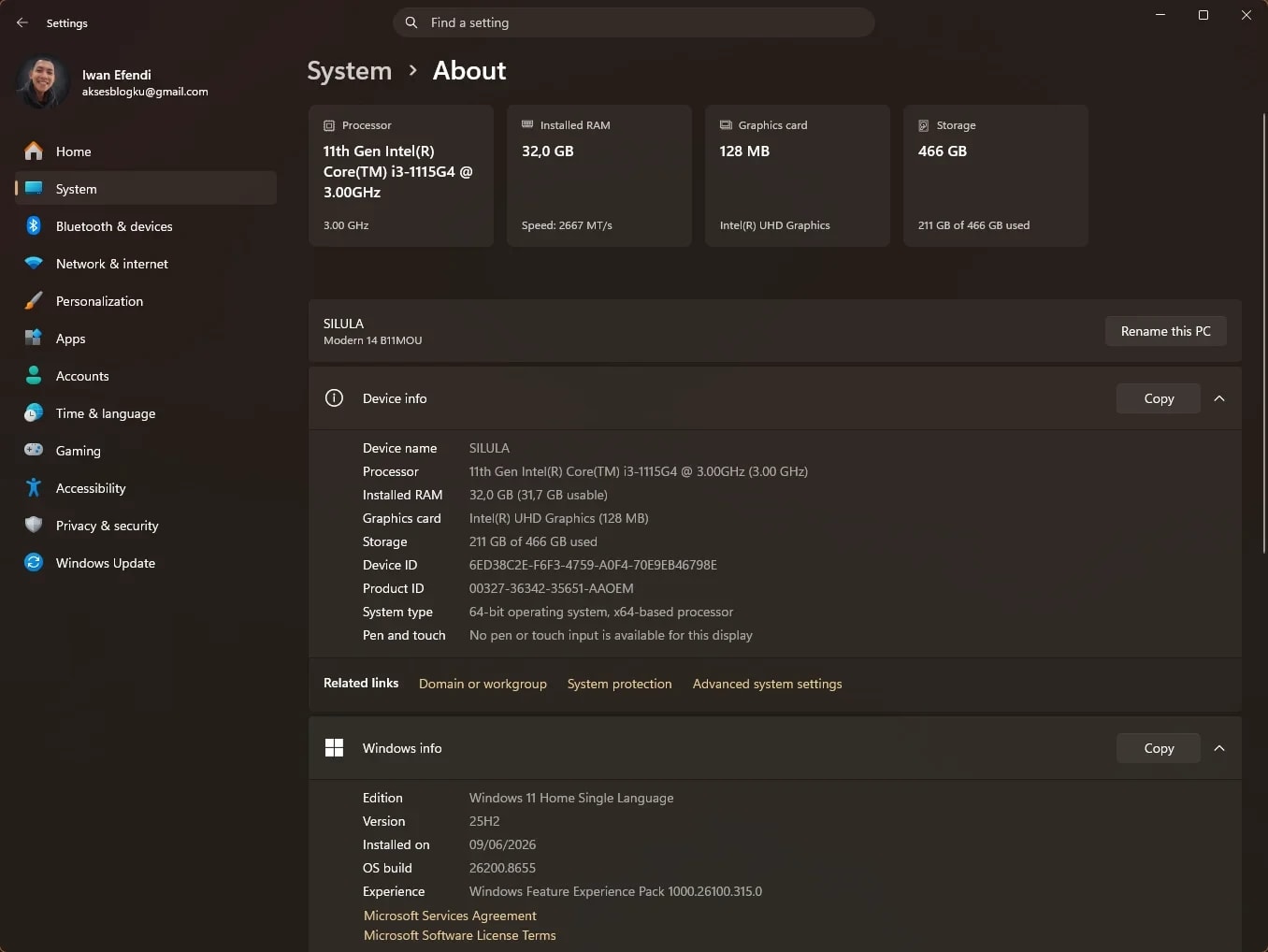 The 32 GB RAM upgrade is honestly the reason this dual-core i3 still feels snappy. Windows host, WSL 2, databases, multiple editor tabs — it handles all of them without breaking a sweat.
The 512 GB SSD is enough for daily dev work, though I do keep an eye on storage since WSL images and project files add up quickly. If you're considering a laptop upgrade on a budget, max out the RAM first before worrying about the CPU. I talk more about this in my RAM upgrade comparison.
The 32 GB RAM upgrade is honestly the reason this dual-core i3 still feels snappy. Windows host, WSL 2, databases, multiple editor tabs — it handles all of them without breaking a sweat.
The 512 GB SSD is enough for daily dev work, though I do keep an eye on storage since WSL images and project files add up quickly. If you're considering a laptop upgrade on a budget, max out the RAM first before worrying about the CPU. I talk more about this in my RAM upgrade comparison.
SILULA runs Windows 11 Home Single Language — the regular release channel, nothing fancy. I keep it updated through normal Windows Update, and the recent quality improvements have made a noticeable difference in day-to-day stability.
On the Windows side, I keep things minimal. Only apps that need native GUI or direct hardware access live here:

All development happens inside WSL 2 running Ubuntu 26.04 LTS (Resolute Raccoon) on kernel 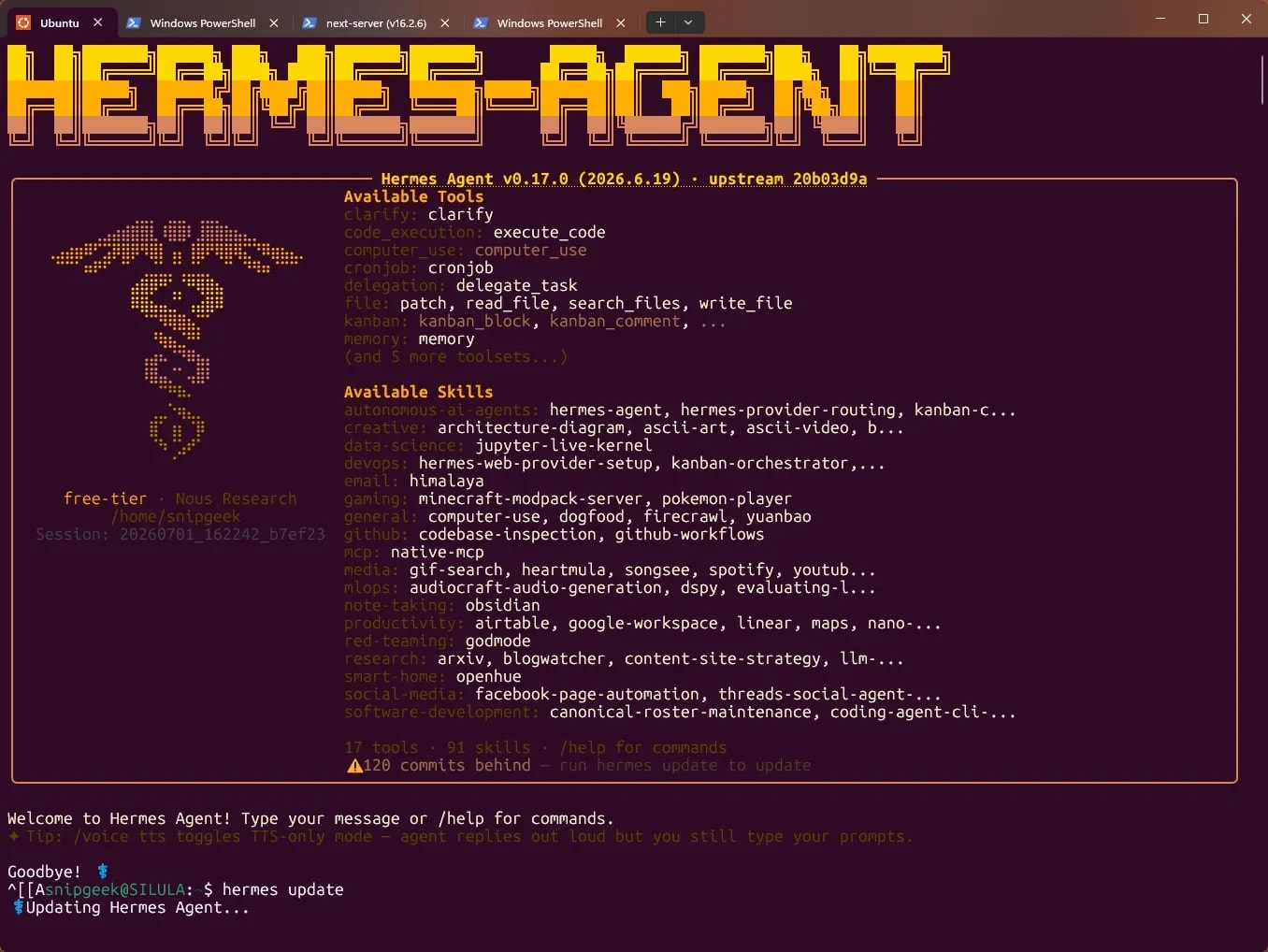
Here's where things get interesting. I run a local AI routing gateway called 9Router on the Windows host and connect my WSL 2 tools to it.
To find your own WSL gateway IP, run 
Since I experiment with a lot of AI coding tools, I keep several editors on Windows (they access WSL files via
2. Why no
With 32 GB of RAM and most workloads inside WSL 2, the default dynamic allocation works great. Hard-limiting WSL to 8 GB would just cause swapping and slower compilations.
3. Why doesn't
Ubuntu 26.04 enforces PEP 668, marking system Python as externally managed. Instead of fighting it, I use
I've tried pure Linux, dual-boot, and macOS. But this Windows 11 + WSL 2 + 9Router combo hits a sweet spot. I get native Linux development via WSL, keep Windows for the apps that need it, and route everything through a local AI gateway that keeps my workflow uninterrupted.
If you're an amateur tinkerer like me and you've been thinking about trying WSL 2 or setting up a local AI router, I hope this helps you skip some of the Googling I had to do.
Got questions about your own setup? Drop a comment below — I'd love to hear what's working for you.
Hardware Specs
- Processor: 11th Gen Intel Core i3-1115G4 @ 3.00GHz (2 cores, 4 threads, Tiger Lake)
- RAM: 32 GB DDR4 (31.7 GB usable) — the single biggest upgrade that makes everything possible
- Storage: 512 GB NVMe SSD (211 GB used, about 255 GB free)
- Graphics: Intel UHD Graphics (128 MB dedicated video memory)
- Display: 14" Full HD (1920x1080) @ 60 Hz
- External Monitor: MSI PRO MP161 E2 Portable Monitor (handy when working at the office or a cafe)
- Peripherals: Logitech M550 mouse + Logitech POP Icon Keys keyboard (managed via Logi Options+)
Zoom
Host OS: Windows 11
- Runtimes & SDKs: Node.js 24.16.0, Python 3.13.13, Git 2.54.0, GitHub CLI 2.93.0, .NET SDK 10.0.300
- Productivity: Notion, Telegram Desktop, PowerToys (lifesaver for window management), OBS Studio, MegaSync, Zoom
- Enterprise: SAP GUI for Windows 8.00 (Patch 15) — real life includes enterprise software
Zoom
WSL 2: Ubuntu 26.04 LTS
6.6.114.1-microsoft-standard-WSL2. No custom .wslconfig — Windows 11 handles resource allocation well by default:
- CPU: All 4 logical threads available
- RAM: Dynamic allocation — typically 8–12 GB out of the 15 GB mapped to the VM
- Storage: Sparse VHD that grows as needed
- Shell: GNU Bash 5.3.9
- Node.js: v22.22.3 (managed via NVM)
- npm: 10.9.8
- Python: 3.14.4 (using uv v0.11.18 as the package manager — way faster than pip and handles PEP 668 gracefully)
- Git: 2.53.0
- Hermes Agent: v0.17.0 at
/home/snipgeek/.local/bin/hermes
pip enabled by default due to PEP 668. I panicked for a second, but uv turned out to be a happy accident. It's genuinely faster and isolates dependencies into .venv automatically. If you're torn between dual-boot and WSL, I've compared both approaches here.
Zoom
The AI Gateway: 9Router + Hermes Agent
What is 9Router?
9Router is an open-source AI routing proxy that exposes a single OpenAI-compatible endpoint (/v1). It runs on localhost:20128 and does two things exceptionally well:
- RTK Token Saver: Compresses CLI tool outputs (like
git diff,grep, error logs) before sending them to the LLM. I've seen 20–40% token savings without losing accuracy. - Smart Multi-Provider Combo: Falls back through a chain of providers if one hits a rate limit or runs out of quota.
My Model Configuration
I keep two combos configured:- free-tier: Routes through Kiro AI (
kr/claude-sonnet-4.5,kr/glm-5) and OpenCode Free (oc/*). Handles my daily coding — for free. - 9Router-Pro: Premium fallback chain (
deepseek-v4-flash,gemini-3.5-flash,step-3.7-flash:free) for when the free tier gets congested.
Connecting WSL 2 to 9Router
This took me a minute to figure out. WSL 2 runs on a separate virtual network (Hyper-V bridge), solocalhost:20128 from inside WSL won't reach the host's 9Router. The fix is simple — point Hermes to the WSL bridge gateway IP instead:
# ~/.hermes/config.yaml
provider: custom
api_base: http://172.20.192.1:20128/v1
model: free-tier
fallbacks:
  - DeepSeek-V3.2-Speciale
  - step-3.7-flash:free
  - gemini-3.5-flash
- deepseek-v4-flaship route show | grep default inside your Ubuntu terminal. The first entry (usually something like 172.x.x.x) is your host's IP.
Zoom
Code Editors & Tools
\\wsl.localhost\Ubuntu\):
- Antigravity IDE (2.1.1) & Antigravity (2.1.4): Main agentic coding environment
- Cursor (3.9.8) & Trae (3.5.60): VS Code forks optimized for AI-assisted workflows
- Zed (1.8.2): For when I just need to open a file and write code fast
- Kiro (0.12.333) & Qoder (1.106.3): Supplementary AI assistants
FAQs
1. Isn't a dual-core i3 too slow for WSL 2 and AI tools?
Not really. The heavy LLM processing happens in the cloud via 9Router's provider chain — the laptop only sends prompts and renders results. The 32 GB RAM upgrade is what keeps everything smooth.2. Why no .wslconfig to limit WSL 2 memory?
With 32 GB of RAM and most workloads inside WSL 2, the default dynamic allocation works great. Hard-limiting WSL to 8 GB would just cause swapping and slower compilations.
3. Why doesn't pip work in WSL 2 Ubuntu 26.04?
Ubuntu 26.04 enforces PEP 668, marking system Python as externally managed. Instead of fighting it, I use uv — it's faster, respects .venv isolation, and sidesteps the restriction cleanly.
Why This Setup Works for Me
References
Topics
Topics in this article
Explore related topics and continue reading similar content.
Share this article
Discussion
Preparing the comments area...